Don't want to build it yourself? Get the finished, tested source code and the full instruction guide in one package, ready to configure for your IBKR paper account. Or build it free with the prompts below.
- This bot trades one strategy only: Trend Join Long. It buys S&P 500 stocks that gapped up 3%+ and keep proving strength, then manages the exit in stages.
- It runs on an IBKR paper account through Trader Workstation, scheduled by Windows Task Scheduler every 5 minutes. Two code guards refuse live accounts.
- You build it with 14 Claude Code prompts (below). Our versions already include the fixes for the bugs we found in the original tutorial.
- Prefer the long version with screenshots? Download the free PDF build guide. Stuck? Ask the bot builder.
What the bot does
Every trading morning the bot scans all 503 S&P 500 stocks for opening gaps of 3% or more and keeps the top 20. From 10:05 to 15:30 ET it checks those names every five minutes against six filters. When one passes all six on a completed 5-minute bar, it buys with a marketable limit order and immediately parks a protective stop at the broker. Then it manages the trade on its own: a third off at +0.75R, stop to breakeven at +1R, a trailing stop under 5-minute swing lows, and everything closed by 15:51. It texts you on Telegram and keeps a live dashboard.
Small scripts, one job each. The decision-maker never places orders; one executor does, because IBKR only lets the client that placed an order change it.
The Trend Join Long strategy
Trend Join Long is a momentum-continuation strategy: rather than guessing a bottom, it joins a trend that is already proving itself. It is long only, trades S&P 500 stocks, and works on 5-minute bars. All six filters must pass at the same time.
| Filter | Rule | Why it matters |
|---|---|---|
| D1 | Price above yesterday's high | The gap is holding, not filling. |
| D2 | Yesterday's close above the 200-day average | Trade with the long-term trend. |
| D3 | Opened at least 3% above yesterday's close | Something real happened overnight. |
| I1 | Above today's premarket high | Buyers are still in control after the open. |
| I2 | A completed 5-minute bar closes at a new high of day | Join strength; don't buy a fade. |
| I3 | Relative volume of at least 2x for the time of day | The move has participation. |
One simulated trade (synthetic prices, real bot code): entry 169.86, stop 164.24 (R = 5.62), a third sold at +0.75R, breakeven at +1R, trailed twice, stopped out at 175.97 for +0.98R overall.
Risk: 1% of a $25,000 sizing base per trade, at most 10% of it in one position, 5 positions at once, 5 new entries a day, and a 3% daily loss stop.
These numbers live in one file, rules.json, which the bot reads every cycle.
What you need
- An Interactive Brokers account with paper trading enabled (paper account IDs start with DU).
- Live market data shared to paper. This is where most builds stall: IBKR only sells the streaming bundles once the live account holds some equity (about US$500 in ours). Subscribe as Non-Professional, then share the data with the paper account.
- Trader Workstation, set to Auto restart, with the API enabled on port 7497.
- Windows 11 (a VM on a Mac works), Python 3.12+, Claude Code, and a Telegram account for alerts.
The build: 14 prompts
Open Claude Code in an empty project folder (for example C:\Projects\trading-bot) and paste one prompt at a time. Read Claude's summary,
run the check, then move on. Each prompt below is our improved version: same structure as the tutorial we started from, with the fixes already in.
Before you start / Accounts, tools, settings
Get every account, program and setting in place so the first prompt works first time.
- The bot only ever talks to an IBKR PAPER account through Trader Workstation (TWS) on port 7497. No real money is involved, and two separate guards in the code refuse anything else.
- Market data is the step most people get stuck on. Paper accounts borrow the live account's data subscriptions, and IBKR only enables streaming API data once the live account holds about US$500.
- Python lives in a project virtual environment (.venv) so the scheduled tasks always use the same packages you tested with.
| Item | What to do |
|---|---|
| Interactive Brokers account | Open an IBKR account and enable its paper-trading account (IDs start with DU). |
| TWS installed | Install Trader Workstation. Log in with the PAPER username. Keep it running while the bot works. |
| TWS API settings | File > Global Configuration > API > Settings: tick Enable ActiveX and Socket Clients, port 7497, untick Read-Only API, add 127.0.0.1 to Trusted IPs. |
| TWS auto restart | Lock and Exit: choose Auto restart (e.g. 11:45 PM), not Auto log off. IBKR still asks for a manual login about once a week. |
| Market data | In the LIVE account's Client Portal: subscribe (Non-Professional) to US Securities Snapshot and Futures Value Bundle plus US Equity and Options Add-On Streaming Bundle, then share market data with the paper account. Needs roughly US$500 equity in the live account. |
| Python | Python 3.12 or newer (the reference build used 3.14.7 on Windows 11). |
| Claude Code | Install Claude Code and open it in your project folder, e.g. C:\Projects\trading-bot. |
| Telegram (step 10) | A Telegram account for phone alerts. You will create a bot with @BotFather later. |
| A machine that stays awake | Windows 11 (a VM on a Mac works). Plugged in, sleep disabled during market hours. |
Set up a Python project for an Interactive Brokers PAPER-trading bot in the current directory.

PREREQ CHECK:
1. Print `python --version` (or `py -3 --version` on Windows). It must be 3.12 or newer. If not, STOP and tell me.
2. Confirm the current directory is empty apart from hidden files. If not, STOP and list what is here.

DO:
1. Create a virtual environment in .venv and install ib_async into it (pip install ib_async).
2. Create test_connect.py that connects to 127.0.0.1:7497 with clientId=10 and a 10-second timeout,
   prints the managed accounts, prints "PAPER OK" if every account ID starts with "D" (paper accounts are DU...),
   otherwise prints "NOT A PAPER ACCOUNT" and exits 1, then disconnects in a finally block.
3. Run test_connect.py with the venv's Python and show me the output.

If the connection is refused, tell me to check that TWS is running, logged in to PAPER, and that
File > Global Configuration > API > Settings has socket clients enabled on port 7497.
From now on, always run Python through .venv (on Windows: .venv\Scripts\python.exe).
.venv\Scripts\python.exe test_connect.py prints your DU... account and PAPER OK.Place one paper order / buy_one.py
Prove that code can place an order on your paper account: buy 1 share.
- Every order sets time-in-force DAY explicitly. Without it TWS applies its own preset, and the first real close attempt in our build was cancelled with error 10349.
- An account guard refuses to continue unless the account ID starts with D (paper).
- The script waits for a final status (Filled / Cancelled), not the transient PendingSubmit.
Place a paper-trading BUY order for 1 share of MU on Interactive Brokers.

PREREQ CHECK:
1. Confirm ib_async imports in the venv. If not, STOP and tell me to install it.
2. Confirm TWS answers on 127.0.0.1:7497 (quick connect with clientId=10). If not, STOP.

CREATE buy_one.py:
- Connect to 127.0.0.1:7497 with clientId=10.
- Account guard: if any managed account does not start with "D", print the accounts and exit 1. Never trade a live account.
- Qualify Stock("MU", "SMART", "USD").
- MarketOrder BUY 1 share. Set order.tif = "DAY" explicitly (without it TWS applies its preset TIF and can cancel the
  order with error 10349). Set order.account to the paper account.
- Wait up to 10 seconds for a terminal status (Filled, Cancelled, ApiCancelled, Inactive). PendingSubmit and
  PreSubmitted are not final.
- Print order ID, fill price (or "pending"), final status. If the order died, print trade.log entries (status,
  message, errorCode).
- Disconnect in a finally block. On a connection error print it and exit nonzero.

RUN buy_one.py with the venv's Python. Print its output and: "ORDERED: 1 share MU. Check TWS positions."
Do NOT close the position. That is the next step.Close the position safely / close_one.py
Flatten one symbol cleanly. This script becomes your manual emergency exit for any position.
- Later the bot leaves a protective stop order resting at the broker. If you sell without cancelling that stop first, the stop can trigger later on a position you no longer own and open a short. So close_one.py cancels working SELL orders first.
- IBKR lets only the client ID that placed an order modify or cancel it, so each order is cancelled from a connection using its owner's client ID.
- --symbol is required so you can never close the wrong thing by accident, and short positions are refused.
Create a safe manual close script for the paper account.

PREREQ CHECK:
1. Confirm buy_one.py exists. 2. Confirm TWS answers on 127.0.0.1:7497.

CREATE close_one.py (usage: python close_one.py --symbol MU; --symbol is REQUIRED):
- Connect with clientId=11. Same paper-account guard as buy_one.py.
- Find the position for --symbol via ib.positions(). If none, print "NO POSITION TO CLOSE" and exit 0.
  If the position is short (negative), refuse and exit 1. This script only closes longs.
- FIRST cancel every working SELL order for that symbol (stops included), from ib.reqAllOpenOrders().
  IBKR only lets the placing client cancel an order, so cancel each one from a short-lived connection that uses
  that order's clientId (order.clientId), then confirm none remain working. If any remain, STOP without selling.
- Then MarketOrder SELL the full position with tif="DAY" and the account set. Wait up to 10 s for a terminal status.
- Print sold quantity, fill price, status. Append the SELL to trades.csv if that file exists
  (columns: timestamp_iso (UTC), symbol, side, size, fill_price, order_id, status, stop_price).
- Disconnect cleanly in finally blocks.

Also update buy_one.py if needed so both scripts set tif="DAY" on every order.
RUN: python close_one.py --symbol MU. Print the output and "CLOSED: position flat. Verify in TWS."
Write the strategy down / rules.json
Turn Trend Join Long into one JSON file the bot reads every cycle. It is the only place strategy and risk numbers live.
- Trend Join Long, in plain words: buy S&P 500 stocks that gapped up at least 3%, are above yesterday's high, trending above their 200-day average, above the premarket high, breaking to a new high of the day on heavy volume.
- The tutorial's JSON left real ambiguities. We pinned each one down: relative volume compares volume so far with the same time of day (a full-day comparison almost never passes at 10:05); "above today's high" means a completed 5-minute bar CLOSES above the high made before it (a price can't be above its own high); the gap is measured from the official open.
- Safety additions: 3% daily loss stop, max 5 new entries a day, one entry per symbol per day, a stop order resting at the broker, a marketable-limit entry instead of a market order, and an account guard.
Create the strategy file for the paper-trading bot. It is the ONLY place strategy and risk parameters live.

PREREQ CHECK: Confirm rules.json does not exist yet. If it does, STOP.

CREATE rules.json with exactly this content, then validate it parses as JSON:

{
  "schema_version": 1,
  "strategy_name": "Trend Join Long",
  "direction": "long_only",
  "trade_timeframe": "5m",
  "timezone": "America/New_York",
  "account_guard": {"mode": "paper", "required_account_prefix": "D", "port": 7497},
  "universe_filters": {"index": "S&P 500", "min_price_usd": 3.0, "exclude_if_halted": true},
  "daily_filters": {
    "D1_above_prior_day_high": true, "D1_price_source": "last_trade_at_evaluation",
    "D2_prior_close_above_sma200": true, "D2_sma_length_days": 200,
    "D3_min_gap_pct_from_prior_close": 3.0, "D3_gap_direction": "up_only",
    "D3_gap_measured_at": "regular_session_open", "D3_max_gap_pct_from_prior_close": null
  },
  "intraday_filters": {
    "I1_above_premarket_high": true, "I1_premarket_window_et": ["04:00", "09:30"],
    "I2_above_today_hod": true, "I2_trigger": "5m_bar_close_above_prior_hod",
    "I3_rvol_min": 2.0, "I3_rvol_lookback_days": 14,
    "I3_rvol_method": "cumulative_volume_vs_same_time_of_day_avg"
  },
  "time_filter": {"earliest_entry_et": "10:05", "latest_entry_et": "15:30", "force_close_et": "15:51"},
  "entry": {
    "order_type": "marketable_limit", "limit_offset_pct_above_ask": 0.2, "unfilled_cancel_after_sec": 30,
    "tif": "DAY", "max_entries_per_symbol_per_day": 1, "candidate_ranking": "rvol_desc"
  },
  "exit": {
    "initial_stop_rule": "lod_minus_1pct", "lod_reference": "regular_session_low_at_entry",
    "R_definition": "entry_price_minus_initial_stop",
    "partial_profit_trigger_R": 0.75, "partial_profit_fraction": 0.3333, "breakeven_trigger_R": 1.0,
    "post_breakeven_trail": "swing_low_5m_2_2", "trail_pivot_left_bars": 2, "trail_pivot_right_bars": 2,
    "trail_only_ratchets_up": true, "stop_order_resides_at_broker": true, "tif": "DAY"
  },
  "risk": {
    "max_risk_per_trade_pct": 1.0, "max_position_size_pct_of_portfolio": 10, "max_concurrent_positions": 5,
    "max_daily_loss_pct": 3.0, "max_new_entries_per_day": 5,
    "sizing_rule": "min(risk_based_shares, position_cap_shares)", "skip_if_sized_shares_below": 1
  }
}

Print the file back. Do not create other files..venv\Scripts\python.exe -c "import json; json.load(open('rules.json')); print('valid JSON')"Configuration and secrets / .env, .gitignore, requirements
Keep connection settings and secrets apart from strategy settings.
- The tutorial's .env repeated three risk limits that also live in rules.json, and they had already drifted (5 trades a day in one file, 8 in the other). We removed them from .env. One source of truth means no silent conflicts.
- PORTFOLIO_VALUE_USD sizes trades as if the account were $25,000, even though IBKR paper accounts start near $1M. That keeps the paper test realistic for a small account.
- Client ID 2 is the read-only brain; client ID 3 is the only process that places or changes orders.
Create the configuration files.

PREREQ CHECK: rules.json exists; .env, .gitignore and requirements.txt do not. Otherwise STOP.

CREATE:
1. .env  (connection, account size and secrets ONLY; strategy and risk limits live in rules.json)
   # Environment and secrets only. Strategy and risk parameters live in rules.json.
   IBKR_HOST=127.0.0.1
   IBKR_PORT=7497
   IBKR_CLIENT_ID=2
   IBKR_EXEC_CLIENT_ID=3
   PAPER_TRADING=true
   PORTFOLIO_VALUE_USD=25000
   TELEGRAM_BOT_TOKEN=
   TELEGRAM_CHAT_ID=
2. .env.example  (same keys, empty secret values, safe to share)
3. .gitignore: .env  .venv/  __pycache__/  *.pyc  trades.csv  logs/  open_positions.json
   safety-check-log.json  watchlist.txt  dashboard/
4. requirements.txt (unpinned): ib_async python-dotenv pandas numpy yfinance requests

Install requirements.txt into .venv, then write requirements.lock with `pip freeze` so the exact tested versions
can be reinstalled later. Print the file tree. Never print the contents of .env after secrets are added.
.venv\Scripts\python.exe -c "import ib_async, dotenv, pandas, yfinance, requests; print('deps ok')"The core bot files / ibkr_client, strategy, trade, bot
Build the four files that talk to IBKR, check safety, size trades and place orders.
- Two processes, two client IDs: the decision-maker (client 2) never places orders; trade.py (client 3) does every order action. IBKR only lets the client that placed an order change or cancel it, so one owner keeps every stop manageable.
- Entries use a marketable limit (ask + 0.2%, cancelled after 30 s) and attach a protective stop at the broker for whatever filled. If the stop is rejected, trade.py sells immediately. A position is never left unprotected.
- Size = the smaller of risk-based shares (1% of $25k / distance to the stop) and a 10% position cap.
Create the core files of the IBKR paper-trading bot. Read rules.json and .env first; strategy and risk numbers
come ONLY from rules.json. Use ib_async (not ib_insync), pathlib, zoneinfo, and anchor every path to the project
folder (Task Scheduler starts scripts in C:\Windows\System32).

PREREQ CHECK: rules.json, .env, requirements.txt exist; Python >= 3.12; ib_async, dotenv, pandas import;
src/ibkr_client.py, strategy.py, trade.py, bot.py do not exist.

CREATE:
1. src/__init__.py (empty)
2. src/ibkr_client.py: class IBKRClient(host, port, client_id, required_account_prefix="D", timeout=10)
   - connect; ACCOUNT GUARD: if any managed account doesn't start with the prefix, disconnect and raise.
   - place_order(symbol, side, qty, limit_price=None, settle_timeout=10): qualify Stock(symbol,"SMART","USD");
     MarketOrder if no limit, else LimitOrder (outsideRth=True); ALWAYS order.tif="DAY" and order.account set;
     wait for a terminal state (Filled, Cancelled, ApiCancelled, Inactive), not PendingSubmit.
   - place_stop(symbol, qty, stop_price): SELL StopOrder, tif DAY, wait until TWS accepts or rejects it.
   - cancel_if_working(trade), disconnect().
3. strategy.py: evaluate(symbol, ib, portfolio_value_usd=None) -> dict, safety gates only (no D1-I3 filters yet):
   a) already holding the symbol, OR a BUY order for it working from ANY client (reqAllOpenOrders) -> fail
   b) weekday and inside earliest/latest entry time (ET) from rules.json
   c) IBKR session check from contract details liquidHours (catches holidays and 1 PM half-days)
   d) max concurrent positions from rules.json
   e) daily loss gate: today's P&L from ib.reqPnL (poll up to ~6 s); if silent, fall back to realized P&L from
      trades.csv + unrealized from ib.portfolio(); if neither is trustworthy, FAIL CLOSED with
      "daily PnL unavailable; cannot verify loss limit"; fail if P&L <= -max_daily_loss_pct of portfolio.
   f) live price: reqMarketDataType(3) then reqMktData; wait up to 10 s for the first tick (first ticks after a TWS login
      can take ~5 s); fall back to today's 5-minute bars; return price, ask, day_low, price_source, data_delayed
      (True when marketDataType is 3/4 or the last bar is stale).
   Cast numpy values to Python types; append every result to logs/safety_log.jsonl.
4. trade.py: the ONLY process that places or changes orders, on IBKR_EXEC_CLIENT_ID. Last stdout line is always
   `RESULT {json}`. Port guard: PAPER_TRADING=true with port 7496/4001 (or the reverse) aborts.
   Modes:
   - order: --symbol --side BUY|SELL --size N [--limit P] [--stop P]. A BUY with --limit waits
     unfilled_cancel_after_sec, cancels any unfilled remainder, keeps a partial fill. A BUY with --stop places a
     broker stop for exactly the FILLED quantity; if that stop is rejected, market-sell the fill immediately.
   - --modify-stop PERMID [--stop P] [--stop-qty N]: modify in place (same orderId), REFUSE to lower the price.
   - --place-stop --size N --stop P.
   - --flatten: cancel this client's working SELLs for the symbol; REFUSE if another client's SELL is still working;
     then market-sell the whole position.
   Append every fill to trades.csv: timestamp_iso (UTC), symbol, side, size, fill_price, order_id, status, stop_price
   (the initial stop on BUY rows). Retry once if the file is locked. Migrate an older header automatically.
5. bot.py: single-symbol tool. --symbol (required), --check-only, --allow-delayed.
   Load .env, port guard, paper-mode check from rules.json, daily entry cap from rules.json (count today's BUY rows
   comparing ET dates, not UTC strings), connect on IBKR_CLIENT_ID, strategy.evaluate, disconnect.
   Refuse to trade on delayed data unless --allow-delayed. Size = min(floor(portfolio*risk%/(price-stop)),
   floor(portfolio*cap%/price)) with stop = day_low * (1 - 1%). Limit = ask * 1.002.
   Spawn trade.py BUY with --limit and --stop; subprocess timeout = fill wait + 30 s (a 30 s timeout would kill a 30 s
   fill wait). Report from the ledger. Prefix prints with [HH:MM:SS ET].

AFTER: print the file tree and "READY: run .venv\Scripts\python.exe bot.py --symbol NVDA --check-only". Do not run it.bot.py --symbol NVDA --check-only shows 'pass': True, price_source 'ticks', data_delayed False.PS C:\Projects\trading-bot> .venv\Scripts\python.exe bot.py --symbol AMD --check-only [10:41:00 ET] evaluate: {'ts_et': '2026-10-05T10:41:00-04:00', 'symbol': 'AMD', 'pass': True, 'reasons': ['time gate ok', 'no existing position', 'session open', 'portfolio limits ok'], 'price': 170.73, 'ask': 170.74, 'day_low': 165.9, 'price_source': 'ticks', 'data_delayed': False, 'daily_pnl': 0.0, 'pnl_source': 'ibkr_pnl'} [10:41:00 ET] check-only: done
A passing safety check (simulated broker and prices; real bot code).
The S&P 500 universe / src/sp500_tickers.py
A hard-coded list of the 503 current S&P 500 tickers in IBKR format.
- IBKR writes class shares with a space (BRK B); Yahoo uses a hyphen (BRK-B). The list stays in IBKR format and the scanner converts. Fetch the list from Wikipedia rather than from the model's memory, which goes stale.
- Refresh it every few months when the index changes.
Create src/sp500_tickers.py with one constant SP500_TICKERS: every current S&P 500 ticker (about 503),
sorted, hard-coded (no fetching at import). Use IBKR format with a space for class shares ("BRK B", "BF B").

Get the list from the current Wikipedia "List of S&P 500 companies" page (fetch it; do not rely on memory). Add a
comment with the source and date. Print the count and the first and last 5 entries. Create no other files..venv\Scripts\python.exe -c "from src.sp500_tickers import SP500_TICKERS as t; print(len(t))" prints about 503.The morning gap scanner / morning_prefilter.py
Every 30 minutes until 12:52 ET, find the S&P 500 stocks that opened 3%+ above yesterday's close and write the top 20 to watchlist.txt.
- yfinance does the scanning (free, no 400-ticker limit); IBKR only does execution.
- Gap = today's OPEN versus yesterday's close, as rules.json defines it. The tutorial measured the live price instead: a stock that gapped +3.63% but was down by the afternoon would have been missed, and one that drifted up late would be wrongly included.
- Before the open, on weekends and holidays there is no bar for today, so the scanner refuses to write a stale list rather than comparing yesterday with the day before.
Create morning_prefilter.py, the gap scanner. Do not modify other files.

PREREQ CHECK: src/sp500_tickers.py exists; yfinance imports; morning_prefilter.py does not exist.

BEHAVIOUR:
- Args: --min-gap (default 3.0), --min-price (default 3.0), --dry-run (don't write watchlist.txt).
  If either threshold is LOOSER than the defaults and --dry-run is not set, refuse with exit 2: test thresholds must
  never overwrite the bot's real watchlist.
- Paths anchored to the script's folder. Convert "BRK B" -> "BRK-B" for Yahoo.
- yf.download(tickers, period="2d", interval="1d", group_by="ticker", threads=5, progress=False, auto_adjust=True).
  threads=5, not more: higher concurrency exhausts file handles under Task Scheduler.
- Per ticker: only use it if the last bar is dated TODAY (ET). gap_pct = (today's OPEN - prior close) / prior close.
  Keep if gap >= min-gap and price >= min-price. Count below_gap, below_price, failed (bad data, continue), no_today_bar.
- If at least half the tickers have no bar for today (pre-open, weekend, holiday): do NOT write a watchlist; print an
  error JSON and exit 1.
- Sort by gap, keep top 20. Write watchlist.txt atomically (temp file + os.replace) with a header line
  "# Auto-generated by morning_prefilter.py at YYYY-MM-DD HH:MM ZONE" (the bot checks this date), then lines like
  "AAPL  # gap +3.45%  open $185.20  prev $180.00".
- Print a JSON summary: success, as_of_date_et, total_screened, survivors_count, below_gap, below_price, failed,
  failed_tickers, no_today_bar, elapsed_seconds, top_20_survivors, watchlist_path.
- Tripwires to stderr: failed >= 95% -> "ALERT: Yahoo-wide failure suspected"; >= 30% -> "ALERT: yfinance degradation".

AFTER: print "READY: run morning_prefilter.py --dry-run". Do not run it.
morning_prefilter.py --dry-run prints success true and today's date.The 5-minute trading cycle / cycle.py
The brain. Every 5 minutes: reconcile with the broker, protect and manage open trades, then look for new entries.
- The broker is the source of truth. Each cycle first compares its own state with IBKR's positions and orders, so a crash, a manual trade or a stop fill can never leave the bot confused.
- Stop-outs are matched by the stop order's permanent ID, never by share count. Matching by quantity caused false stop-outs after partial sells in an earlier version.
- Partial profit first, then breakeven: at +0.75R sell a third, at +1R move the stop to entry, then trail under 5-minute swing lows. Before selling the third, the stop is SHRUNK to the shares left, so a full-size stop can never sell shares you no longer hold.
Create cycle.py, the autonomous 5-minute trading cycle. It reuses bot.py sizing and strategy.evaluate.
cycle.py connects on IBKR_CLIENT_ID and is READ-ONLY at the broker: every order action (entries, stop changes,
partial sells, force-closes) runs `trade.py` as a subprocess and parses its RESULT line.

PREREQ CHECK: bot.py, trade.py, strategy.py, rules.json, morning_prefilter.py, src/ibkr_client.py exist;
cycle.py does not.

main() in order:
1. TIME GATE using only the standard library (import pandas/yfinance/ib_async lazily, after the gate, so weekend and
   off-hours runs exit in under 1 s): weekend | too_early (<10:00) | closed (>=16:00) | manage_only (10:00-10:05 and
   after latest entry) | force_close (>= force_close_et) | ok. After connecting, re-check against IBKR's real session
   close for today (SPY liquidHours): exit on holidays; on half-days shift force-close and last-entry by the same
   distance from the close.
2. LOCK file logs/cycle.lock (stale after 600 s) so runs never overlap. Write logs/heartbeat.json every run and one line
   per stage to logs/cycle_runs.jsonl.
3. CONNECT (retry once after 5 s; on failure log connect_failed, alert, exit 1).
4. RECONCILE with the broker (source of truth), state in open_positions.json (atomic writes):
   - position gone at the broker: look for a fill whose permId == the position's stop_perm_id (reqExecutions).
     Found -> stop-out: append a SELL row with status StopFilled, alert. Not found -> closed externally, alert.
     NEVER match by quantity.
   - quantity differs -> trust the broker.
   - adopt broker positions bought TODAY by the bot (BUY rows in trades.csv) that state doesn't know (crash recovery).
   - every position must have a broker stop covering exactly its quantity: fix the quantity in place, or place one at
     the current stop / day low - 1%; if impossible, log UNPROTECTED_POSITION and alert at high priority.
5. MANAGE with live IBKR prices (skip a position whose data is delayed; its broker stop still protects it):
   - state "open" and price >= entry + 0.75R: k = ceil(qty x 0.3333). FIRST shrink the stop to qty-k (modify in place),
     THEN sell k. If the sale fails, restore the stop to the full quantity. If k would be the whole position, flatten.
   - state "partial_done" and price >= entry + 1R: modify the stop to the entry price (breakeven), then state "trailing".
     Partial and breakeven may both happen in the same cycle.
   - "trailing": newest confirmed swing low among COMPLETED regular-session 5-minute bars since entry (low below the 2 bars
     before and 2 after). New stop = swing low - 0.01, only if above the current stop and below price (ratchet up only).
   - stops are always MODIFIED IN PLACE (trade.py --modify-stop), never cancelled and re-placed.
6. FORCE CLOSE window: trade.py --flatten each position; keep failures in state so the next cycle retries.
7. MANAGE ONLY window: stop here.
8. ENTRY SCAN: daily entry cap from rules.json; read watchlist.txt only if its header date is TODAY; split lines on "#"
   (class shares contain a space); skip anything held (ib.positions() FIRST) or in state.
   Pull yfinance daily (1y) and 5-minute (30d, prepost=True) data in one batch each, through a helper with a hard 60-second
   wall-clock deadline (daemon thread); on timeout log yfinance_timeout, alert, skip the step, and hard-exit at the end.
   Evaluate the six filters on COMPLETED bars only:
     D1 last completed 5m close > prior day high; D2 prior close > 200-day SMA; D3 (official daily open - prior close)
     / prior close >= 3%; I1 last close > premarket high (04:00-09:30); I2 last completed bar closes above the high of
     the earlier bars today; I3 cumulative RTH volume through that bar / average cumulative volume at the same time of
     day over the previous 14 sessions >= 2.0.
   Rank passing symbols by RVOL. For each: strategy.evaluate (live gate; skip if delayed), size with bot.size_position,
   limit = ask x 1.002, run trade.py BUY --limit --stop, save state IMMEDIATELY after a fill.
9. Save state, release the lock, disconnect, rebuild the dashboard if one exists (never let that break trading).

Log every decision as one JSON line in safety-check-log.json (cast numpy types). Unhandled exception -> traceback to
logs/cycle_errors.log, exit 1. Prefix prints with [HH:MM:SS ET].

AFTER: print "READY: run cycle.py; outside market hours it exits in under a second". Do not run it.cycle.py prints e.g. too_early: nothing to do instantly. In market hours it prints status=ok and one decision per watchlist symbol.PS C:\Projects\trading-bot> .venv\Scripts\python.exe cycle.py [11:31:00 ET] status=ok (close 16:00) [11:31:00 ET] stop 2 modified: 14@164.24 -> 9@164.24 status=Submitted RESULT {"mode": "modify_stop", "symbol": "AMD", "ok": true, "stop_order_id": 2, "stop_perm_id": 1840211015, "stop_price": 164.24, "stop_qty": 9, "status": "Submitted"} [11:31:00 ET] order 3: SELL 5/5 AMD @ 174.21 status=Filled RESULT {"mode": "order", "symbol": "AMD", "side": "SELL", "requested": 5, "filled": 5, "fill_price": 174.21, "status": "Filled", "order_id": 3, "perm_id": 1840211022} [11:31:00 ET] partial_taken: {"symbol": "AMD", "sold": 5, "price": 174.21, "remaining": 9, "trigger_R": 0.75} [11:31:01 ET] entry_skipped: {"symbol": "AMD", "reason": "already held"} [11:31:01 ET] entry_skipped: {"symbol": "HOOD", "reason": "filters", "pass": false, "checks": {"D1_above_prior_day_high": false, "D2_prior_close_above_sma200": true, "D3_gap": true, "I1_above_premarket_high": false, "I2_close_above_prior_hod": false, "I3_rvol": true}, "last_close": 102.17, "prior_high": 103.5, "sma200": 72.99, "gap_pct": 5.2, "premarket_high": 105.62, "prior_hod": 105.22, "rvol": 2.61, "trigger_bar": "11:25"} [11:31:01 ET] entry_skipped: {"symbol": "CCL", "reason": "filters", "pass": false, "checks": {"D1_above_prior_day_high": true, "D2_prior_close_above_sma200": false, "D3_gap": true, "I1_above_premarket_high": true, "I2_close_above_prior_hod": false, "I3_rvol": true}, "last_close": 21.18, "prior_high": 20.3, "sma200": 22.33, "gap_pct": 3.4, "premarket_high": 20.69, "prior_hod": 21.21, "rvol": 2.87, "trigger_bar": "11:25"}
11:31 in the simulated day: the trade reached +0.75R, so the cycle shrank the broker stop to 9 shares first, then sold 5.
Phone alerts / src/notify.py (Telegram)
Telegram messages for entries, partials, breakeven, trailing, stops, force closes, crashes and the daily summary.
- HTML formatting, not Markdown: Telegram silently rejects Markdown messages that contain an unbalanced _ * or [ , which is common in error text, so you'd lose exactly the alerts that matter.
- If sending fails, the library's error contains the URL, token included. The token is redacted before anything is logged.
- The scanner only messages you when its list is new or changed (not 13 identical messages a day). Critical alerts are de-duplicated hourly. A notification can never break trading logic.
- On Telegram, message @BotFather, send /newbot and follow the prompts. Save the token.
- Message @userinfobot with /start to get your chat ID.
- Paste both into .env (TELEGRAM_BOT_TOKEN=, TELEGRAM_CHAT_ID=). Never paste them into a chat window.
- Open a chat with your new bot and press Start, or it can't message you.
Add Telegram push notifications. Do NOT change any trading logic; only add notification calls.

PREREQ CHECK: cycle.py, morning_prefilter.py, src/__init__.py exist; requests imports; src/notify.py does not exist.

CREATE src/notify.py with notify(title, body, priority="default") -> None:
- Load TELEGRAM_BOT_TOKEN, TELEGRAM_CHAT_ID and optional NOTIFY_URL (ntfy) from .env (explicit path).
- Telegram: POST sendMessage with parse_mode="HTML" (NOT Markdown) and html-escaped title/body, "⚠️ " prefix for
  high priority, 5 s timeout, max 4096 chars. ntfy: POST body with Title and Priority headers.
- Never raise. Log failures to logs/notify_errors.log with the bot token REDACTED (also redact any bot<digits>:<key>).
- Never print the token or chat ID anywhere.

WIRE IT IN (each call wrapped so a failure can't affect trading):
- morning_prefilter.py (not on --dry-run): message only when the list is the first of the day or changed:
  "Prefilter HH:MM ET" with "N/503 survivors" and a bullet per ticker. Failures and tripwires at high priority.
- cycle.py: BUY, PARTIAL, BE, TRAIL, STOP, CLOSED (position gone, not a bot stop), EXIT, "EOD Force Close" (high),
  "Cycle CRASHED" (high), yfinance timeout; critical events (UNPROTECTED_POSITION, FORCE_CLOSE_FAILED, connect_failed,
  trade_timeout) at high priority, de-duplicated per symbol for an hour.

AFTER: print how to test: .venv\Scripts\python.exe -c "from src.notify import notify; notify('Test', 'Hello')" Daily summary and log rotation / compute_perf.py, rotate_logs.py
One summary after the close, and housekeeping so the bot can run for months.
- Trades are matched by SHARES, first-in-first-out. The bot exits in pieces (a third at +0.75R, the rest later), so pairing rows one-to-one would count one trade as two.
- R per trade is measured against the dollars actually risked (entry minus the initial stop recorded at entry), not a fixed 1% of the account.
- Only one summary a day, at 16:05, after the 15:56 force-close retry. rotate_logs never rewrites trades.csv during market hours, when trade.py might be appending a fill.
Add the daily performance summary and log rotation.

CREATE compute_perf.py (read-only on trades.csv; safe any time):
- Load trades.csv. Match BUY and SELL by SHARES, FIFO per symbol: one BUY lot is
  one trade, closed when all its shares are sold (partials roll into the same trade). Use ET dates.
- Per trade: entry, average exit, P&L $, P&L %, hold minutes, initial stop (BUY row's stop_price; else the cycle's
  decision log; else a 1% proxy flagged as estimated), R = (avg exit - entry) / (entry - initial stop), exit kind.
- Aggregates: total_trades, wins, losses, win_rate_pct, gross_pnl_usd, largest winner/loser, avg winner/loser,
  profit_factor ("inf" if no losses, "n/a" if no trades). Print JSON.
- Unless --no-notify: one Telegram message "Daily Summary YYYY-MM-DD". Options --date, --no-notify, --no-dashboard.

CREATE rotate_logs.py (exit 0 even with nothing to do):
- logs/*.log and logs/*.jsonl last modified before today (ET) -> logs/archive/<date>/ with os.replace.
- trades.csv rows older than 90 days -> logs/archive/trades_<today>.csv, but NEVER between 09:25 and 16:15 ET.
- safety-check-log.json over 5 MB -> archived with today's date.
- Skip files another process has open (Windows) and retry next run. Staged, atomic swaps only.

AFTER: print how to run both. Do not run them.compute_perf.py --no-notify prints the JSON summary.Put it on autopilot / setup_schedule.py (Task Scheduler)
Register five Windows scheduled tasks that run everything on weekdays, plus a one-command emergency stop.
- Priority 4, not Task Scheduler's default 7. At priority 7 Windows also lowers disk priority: a cycle that took 4 seconds by hand took about 60 seconds (3.5 minutes cold) when scheduled. At 4 it takes about 2 seconds.
- Tasks are registered from XML, which plain schtasks flags can't express: run on battery, wake the computer, catch up after sleep, never overlap, a 10-minute time limit, and repeat only inside a weekday window. XML dates are ISO, so regional date formats can't break it.
- pythonw.exe runs without a console window popping up every 5 minutes. Five tasks with repetition replace the tutorial's eleven.
| Task | When (ET, Mon-Fri) | Runs |
|---|---|---|
| HT_LogRotate | 09:15 | rotate_logs.py |
| HT_KeepAwake | 09:30 | powercfg: no sleep on AC power |
| HT_Prefilter | 09:52, every 30 min to 12:52 | morning_prefilter.py (7 runs) |
| HT_Cycle | 10:01, every 5 min to 15:56 | cycle.py (72 runs) |
| HT_Dashboard | 16:05 | compute_perf.py |
Create setup_schedule.py and cleanup_schedule.py for Windows Task Scheduler (current user, no admin).

PREREQ CHECK: cycle.py, morning_prefilter.py, compute_perf.py, rotate_logs.py and .venv\Scripts\pythonw.exe exist;
we are on Windows (`where schtasks`). Otherwise STOP.

setup_schedule.py [--dry-run]:
- Register these 5 tasks, Monday-Friday, times in ET converted to this PC's local time with zoneinfo:
  HT_LogRotate 09:15 rotate_logs.py; HT_KeepAwake 09:30 `powercfg /change standby-timeout-ac 0`;
  HT_Prefilter 09:52 repeating every 30 min until 12:52; HT_Cycle 10:01 repeating every 5 min until 15:56;
  HT_Dashboard 16:05 compute_perf.py.
- Build each as Task Scheduler XML and register with `schtasks /create /tn NAME /xml FILE /f` (XML saved as UTF-16 in
  logs/schedule/). Settings: Priority 4 (NOT the default 7, which also lowers I/O priority and made cycles ~15x slower),
  DisallowStartIfOnBatteries false, StopIfGoingOnBatteries false, WakeToRun true, StartWhenAvailable true,
  MultipleInstancesPolicy IgnoreNew, ExecutionTimeLimit PT10M, working directory = project folder,
  command = .venv\Scripts\pythonw.exe (no console windows). Use ISO dates in the XML (no locale parsing).
- Before changing power settings, save the current sleep timeout to logs/power_backup.json.
- Warn if this PC's time zone changes daylight saving time on different dates than New York.
- --dry-run: write the XML only. Print a table of HT_* tasks with next run times.

cleanup_schedule.py: delete every HT_* task and restore the saved sleep setting (or 30 min if none). Idempotent;
"Nothing to clean." when there are none. This is the emergency stop.

AFTER: print how to run both. Do NOT register anything yourself.
setup_schedule.py prints SCHEDULED: 5 tasks created and the next HT_Cycle time.The performance dashboard / dashboard.py
A self-contained HTML page with P&L, R-multiples, open positions with live R, bot status and recent activity.
- R comes from the actual stop recorded at entry, so the dashboard measures the edge, not the position-size cap.
- Status comes from the cycle's heartbeat (ACTIVE, STALE, IBKR DOWN, IDLE, NO DATA), not a hard-coded ACTIVE label.
- It is rebuilt every cycle (a once-a-day file that refreshes every 30 s would show stale data all day). No JavaScript and no CDNs, so it opens straight from disk and can be hosted anywhere.
Create dashboard.py and call it from compute_perf.py and at the end of each working cycle (wrapped so it can
never affect trading).

dashboard.py builds dashboard/index.html, self-contained: inline CSS and inline SVG charts, NO JavaScript, NO CDN
links, <meta http-equiv="refresh" content="30">, <meta name="robots" content="noindex">. Dark theme.
Content, from trades.csv (all history), open_positions.json, logs/heartbeat.json and safety-check-log.json:
- KPI strip: today P&L, total P&L (% of PORTFOLIO_VALUE_USD), win rate, expectancy (R and $), profit factor,
  max drawdown and loss streak.
- Bot status from the heartbeat: ACTIVE (recent cycle), STALE (cycles stopped during market hours), IBKR DOWN
  (connect_failed), IDLE (outside hours), NO DATA. Show heartbeat time, entries today vs cap, risk settings.
- Equity curve (cumulative P&L per closed trade), R-multiple histogram (<=-2R ... >+3R), daily P&L bars.
- Open positions: qty, entry, current stop, last price, unrealized $ and R, and a small track from stop to +2R.
- Recent closed trades (last 20) with R colour-coded, a by-symbol table, and the latest bot decisions.
Use the FIFO/R logic from compute_perf.py. Escape all text. Axis ticks must enclose the data range.

AFTER: print "READY: run dashboard.py and open dashboard/index.html". Do not run it.
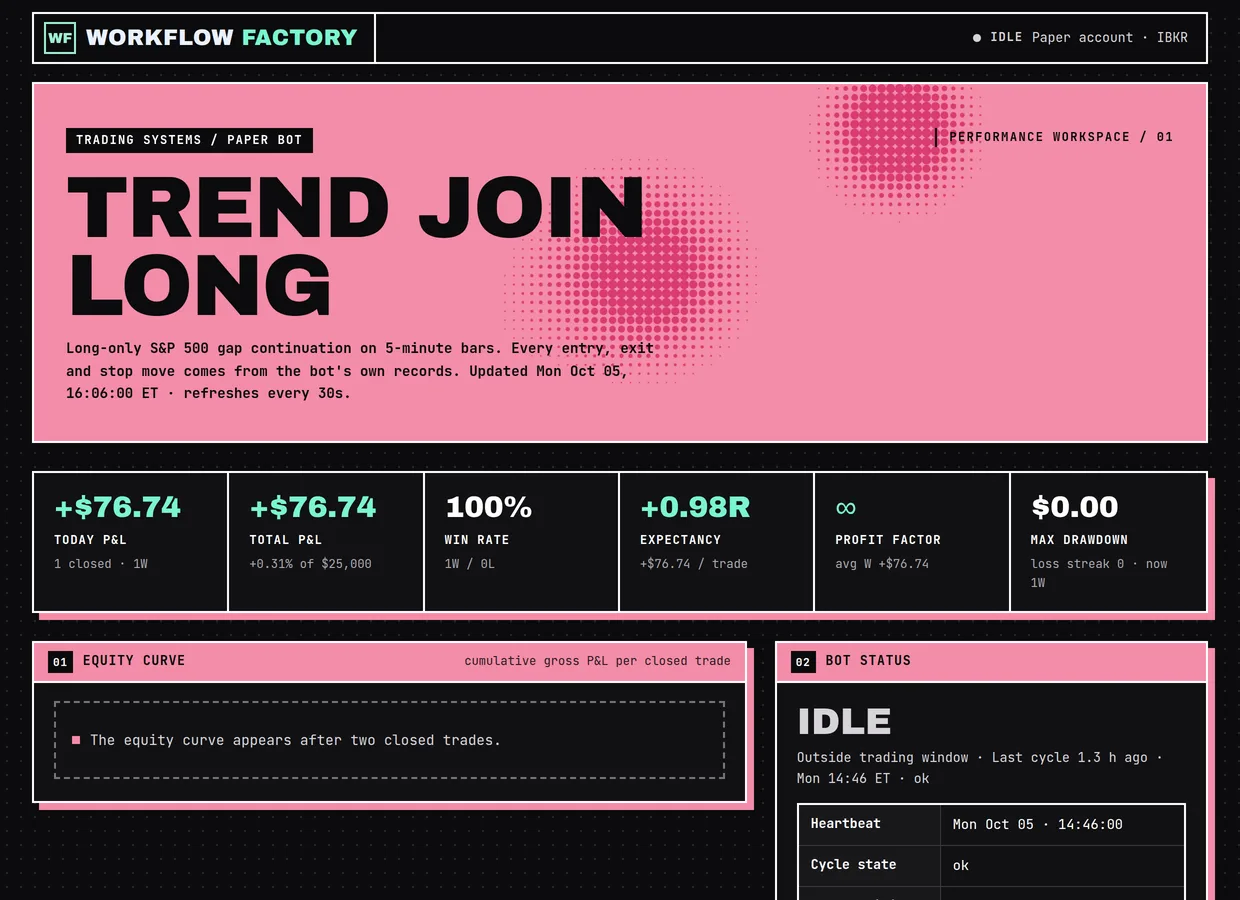
The dashboard after the simulated day, shown with our site styling (as on our live dashboard). The dashboard.py you build has the same panels with plainer styling.
Test, then go live on paper / Check-only, end-to-end, schedule
Prove the whole chain on the paper account during market hours, then switch on the schedule.
- Code that has only run off-hours hasn't met real quotes, real P&L, or a real order book. One supervised round trip catches what simulations can't.
| When | Do this |
|---|---|
| 09:45 ET | TWS open and logged in to PAPER. Live account logged OUT everywhere (Client Portal, IBKR Mobile). |
| After 10:05 | bot.py --symbol NVDA --check-only -> 'pass': True, price_source 'ticks', data_delayed False. |
| Then | bot.py --symbol NVDA -> buys a small position and places the stop. Check both in TWS. |
| A few minutes later | close_one.py --symbol NVDA -> cancels the stop (Error 202 = cancel confirmation), sells, flat. |
| Check | compute_perf.py --no-notify shows 1 trade with a real R; open the dashboard. |
| Only if all passed | setup_schedule.py --dry-run, then setup_schedule.py. Watch Telegram for the 09:52 scan. |
It's market hours. Walk me through the end-to-end paper test one command at a time and check each output
before the next: (1) bot.py --symbol NVDA --check-only, (2) bot.py --symbol NVDA, (3) verify in IBKR that the position
and its stop exist, (4) close_one.py --symbol NVDA, (5) verify flat with no working orders, (6) compute_perf.py
--no-notify. If anything fails, stop and diagnose; do not schedule anything. If all pass, show me
setup_schedule.py --dry-run and wait for my go-ahead before registering the tasks.
What we changed vs the original tutorial
We started from Humbled Trader's Claude + IBKR trading bot tutorial, which has the right structure. Building it for real surfaced bugs that would have cost money on a live account. The most important fixes:
- Order ownership. The original cycle tried to change stops placed by a different client ID, which IBKR doesn't allow. One executor now owns every order.
- Exit order. Partial profit at 0.75R now happens before breakeven at 1R, and the stop is shrunk before the partial sale so it can never sell shares you no longer hold.
- Never unprotected. Stops are modified in place instead of cancelled and re-placed, and a rejected stop triggers an immediate exit.
- Stop-outs by order ID, not quantity, with broker reconciliation every cycle and crash recovery.
- The gap is measured at the open, not from the live price, and the scanner refuses to write a stale list before the open.
- Safety: explicit DAY time-in-force (error 10349), paper-account and port guards, a fail-closed daily-loss check with a P&L fallback.
- Scheduling: five XML tasks at priority 4 instead of eleven at priority 7 (cycles went from about a minute to about two seconds).
- Alerts and analytics: HTML Telegram messages with the token redacted from logs, FIFO trade matching, and R measured against the real stop.
Troubleshooting
The ten problems you are most likely to hit. The PDF guide lists all of them, and the bot builder assistant answers from the same notes.
| You see | Why | Fix |
|---|---|---|
| Error 162: 'Trading TWS session is connected from a different IP address' | The LIVE account was logged in somewhere else (Client Portal, IBKR Mobile, another TWS). Market data can only stream to one session, and the paper account borrows the live account's data. | Log the live account out everywhere, then restart TWS on the paper login. Keep it logged out during trading hours. |
| Warning 2186: real-time data 'requires additional subscription for API' | The free non-consolidated quotes in the portal are not enabled for the API. | In the live account's Client Portal subscribe (Non-Professional) to 'US Securities Snapshot and Futures Value Bundle' and 'US Equity and Options Add-On Streaming Bundle', then enable market data sharing with the paper account. |
| Can't subscribe to the data bundle | IBKR requires the live account to hold equity (about US$500) before it sells market-data subscriptions. | Fund the live account (about US$500 was enough), then subscribe and share data with paper. You still trade only on paper. |
| Order cancelled right away: error 10349 | The order had no time-in-force, so TWS applied its own preset and cancelled it. | Set order.tif = "DAY" explicitly on every order the bot sends: entries, stops, exits. All the prompts in this guide already do. |
| 'daily PnL unavailable; cannot verify loss limit' | IBKR's reqPnL stream can stay silent with no error right after a fresh TWS login. The gate correctly refused to trade blind. | The bot now falls back to realized P&L from its own trades.csv plus unrealized P&L from the portfolio, and reports pnl_source. If both are unavailable it still refuses. |
| Scheduled cycle takes a minute instead of seconds | Task Scheduler's default priority 7 also lowers the process's disk (I/O) priority. | Register the tasks from XML with <Priority>4</Priority>. Cycles dropped to about 2 seconds. |
| 'watchlist is stale (yesterday), not today' | The cycle ran before the day's first scan. The bot refuses to trade yesterday's gappers. | Normal before 09:52 ET. If it persists after 10:00, check the HT_Prefilter task and the Yahoo connection. |
| Connection refused / connect_failed | TWS isn't running, is logged in to live (port 7496), or the API socket isn't enabled. | Start TWS on the PAPER login; File > Global Configuration > API > Settings: enable socket clients, port 7497, trusted IP 127.0.0.1. |
| The bot runs all day but never trades | All six filters must pass on the same completed bar. Common blockers in the real logs: a stock below its 200-day average (D2), or a gap that never reclaims its premarket high or makes a new high (I1/I2). Relative volume also fades through gap days, so afternoon entries are rare. | That is the strategy being selective, not a bug. Read the decision log (safety-check-log.json): each skip lists which checks failed. Don't loosen rules without a backtest. |
| 'Error 202 Order Canceled' when closing | That's IBKR confirming the cancellation of the resting stop before the sell. Not a failure. | Nothing to fix. The script cancels working SELL stops first on purpose, so the stop can't trigger later on a flat position. |
FAQ
What is the Trend Join Long strategy?
A long-only, intraday strategy on S&P 500 stocks using 5-minute bars. It buys stocks that gapped up at least 3% and keep showing strength: above yesterday's high, above the 200-day average, above the premarket high, breaking to a new high of the day on at least twice the usual volume for that time of day. Entries run 10:05 to 15:30 ET and everything is closed by 15:51 ET.
What are the six filters?
Daily: D1 last completed 5-minute close above the prior day's high; D2 prior close above the 200-day SMA; D3 open at least 3% above the prior close. Intraday: I1 above today's premarket high (04:00 to 09:30); I2 a completed 5-minute bar closes above the high of the day made before it; I3 relative volume at least 2.0, comparing volume so far with the same time of day over the last 14 sessions. All six must pass on the same bar.
How does the bot exit a trade? Is there a take-profit?
No fixed take-profit. The initial stop is the day's low minus 1%, placed at the broker as soon as the entry fills. At +0.75R it sells a third; at +1R it moves the stop to the entry price; after that it trails the stop under each new confirmed 5-minute swing low. Anything left is sold at 15:51 ET. R is the distance from entry to the initial stop.
How big is each position?
The smaller of two numbers: risk-based shares (1% of PORTFOLIO_VALUE_USD divided by the distance to the stop) and a 10% position cap. With the default $25,000 that's at most $250 at risk and $2,500 per position, with up to 5 positions and 5 new entries a day, and a 3% daily loss stop.
Does it trade real money?
No. It is built for an IBKR paper account only, and two independent guards enforce it: a port guard (paper flag with a live port aborts) and an account guard (every account ID must start with D). Paper results are not evidence that a strategy is profitable, and nothing here is financial advice.
Why is IBKR asking for a deposit when I only want paper trading?
Paper accounts get live market data by sharing the live account's subscriptions, and IBKR only sells those once the live account holds some equity (about US$500 in our build). The money stays in your account; the bot never trades it.
What does it cost to run?
The libraries are free and open source (ib_async, pandas, yfinance). IBKR's market-data bundles have monthly fees set by IBKR; check the current prices on your account's market-data page. Telegram is free. Claude Code needs a Claude plan.
Why two client IDs?
IBKR only lets the client that placed an order modify or cancel it. So one process (trade.py, client 3) places and changes every order, and the decision-maker (cycle.py, client 2) only reads. That keeps every stop manageable.
Why yfinance for scanning and IBKR for trading?
Scanning 503 stocks through IBKR hits its concurrent market-data limits. Yahoo data via yfinance is free and fine for screening. Every order and every live price used for sizing and exits comes from IBKR.
What does R mean?
R is the risk per share at entry: entry price minus the initial stop. A trade closed at +1R made as much as it risked. The bot and dashboard measure R against the stop actually recorded at entry.
Next steps
Disclaimer: educational software for paper trading. Not investment advice or a recommendation to buy or sell any security. Simulated and paper results do not include real costs, slippage or risk. Interactive Brokers, IBKR, Trader Workstation, Telegram, Yahoo and Claude are trademarks of their owners; no affiliation is implied.